To Buy Checklist KDP Interior: Integrating Structure into Your Daily Planning Workflow
Most planning systems collapse not because the idea is bad, but because tracking gets messy. When you need to monitor upcoming purchases, manage inventory for a side business, or simply remember what to pick up across multiple stores, a scattered digital note or a scrap of paper rarely holds up over time. The To Buy Checklist KDP Interior addresses that gap directly by offering a clean, repeatable template that moves a simple shopping list into a more disciplined record-keeping asset. It is designed as a ready-to-upload interior for Amazon KDP, but its real value shows up in how it interacts with procurement routines, budget checkpoints, and even content creation workflows for publishers.
Whether you are a freelancer tracking equipment upgrades, a small business owner ordering supplies on a cycle, a parent coordinating household purchases, or a KDP publisher looking to add a practical low-content book to your catalog, the interior becomes a central reference point. It removes the guesswork from formatting and lets you concentrate on what you are actually planning to buy, when, and why.
Understanding the Foundation of a Print-Ready Checklist Interior
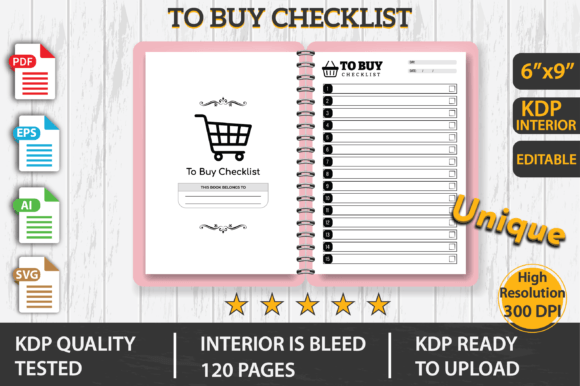
At its core, a KDP interior is the internal file that Amazon uses to print the pages of a book. For low-content publications like journals, planners, and checklists, the interior must meet precise specifications to avoid printing errors. This product ships as a 6×9 inch template (also given as 15.24 x 22.86 cm) set up with bleed, meaning elements extend to the edge of the page so nothing gets clipped during trimming. The file runs 120 pages, a page count well-suited for tracking purchases over a quarter or for keeping within a reasonable production cost range on KDP.
What makes this interior more versatile than a static PDF is the inclusion of editable source files. You receive the design in PDF, EPS, AI, and SVG formats. That means you do not have to build everything from scratch in Adobe InDesign or Canva. You can open the vector files and adjust fonts, reposition lines, add branding, or even split the interior into shorter book variants. The files have been tested on KDP with no errors, so the typical back-and-forth of fixing margins, spine alignment, or image resolution is already handled.
Where the To Buy Checklist Fits in Your Broader Process
A checklist interior is not just a static piece of content; it sits inside a larger planning or publishing system. For personal use, you might print selected pages and slip them into a household binder, pairing the pages with a monthly budget spreadsheet. For commercial use, you launch the checklist as a KDP book and then build a series of related productivity tools around it. The interior works as:
- A pre-purchase decision log – capture item details, estimated cost, priority level, and purchase date before committing.
- A recurring order tracker – ideal for repeatable business supplies where you note vendor, lead time, and reorder thresholds.
- A shared family or team shopping master – one person fills in the checklist, another takes it to the store or places online orders.
- A low-content book product – publish it on KDP under your own brand and earn royalties from customers looking for practical stationery.
Because the file is editable, you can reshape the entire layout to target a specific audience. A real estate professional might tweak the checklist to track staging supplies. A crafter or maker could adapt it for raw materials. This adaptability means you are not locked into a generic “to buy” header; you can evolve the interior into a niche procurement tool that works for a defined group of people.
Using the Interior Before, During, and After a Purchase Cycle
The full workflow with a structured checklist spans three distinct phases. Before you buy, the checklist acts as a research canvas. You can note alternatives, link to reviews, and set a maximum budget per line item. Logging these details on paper – or in a printed book – slows down impulse decisions and surfaces patterns, like discovering you consistently overspend on last-minute shipping fees.
During the purchasing phase, the physical checklist keeps you focused. When you walk into a warehouse store or open multiple browser tabs, having a pre-filled list reduces the mental load. Check off items as you add them to the cart. Write in actual prices versus estimated ones. This practice creates immediate feedback for your budgeting assumptions and often exposes small leaks before they compound.
After the purchase, the used pages become a lightweight archive. Instead of scattered receipts, you have a single source showing what you bought, when, and at what cost. This history works well for small business expense tracking, warranty registration, or even reconciling credit card statements at the end of the month. When tax season arrives, flipping through a completed checklist can surface deductible purchases you might otherwise forget.
Integrating the Checklist with Digital Tools and Other Resources
A paper-based interior does not exist in isolation. Its strongest implementation often involves pairing a physical log with a few digital counterparts. For example, you might keep a running wishlist in a notes app or a shared Google Sheet, then every Sunday transfer the must-buy items into the printed checklist. This hybrid approach lets you benefit from the flexibility of digital capture and the clarity of a focused paper format.
For KDP publishers, the interior interacts with several other assets. You will pair it with a custom cover design, a book description that explains how to use the checklist, and possibly a series of related interiors (such as a bill tracker or inventory log) to build a recognizable product line. The editable source files allow you to keep design consistency across all of them – same font pairings, same header style, same margin structure – so your entire catalog feels cohesive. When you upload the PDF to KDP, the platform’s previewer immediately shows you how the interior flows from one page to the next, and since this file is pre-tested, you spend less time troubleshooting.
Practical Implementation Tips for Creators and Business Owners
If you plan to use the interior primarily for yourself, begin by deciding how many pages you will print and bind. A full 120-page book may be overkill for a monthly shopping routine, but you can print smaller batches at a local print shop or use a disc-bound system that lets you swap sheets. Before printing, open the SVG or AI file and insert a few personalized fields – maybe a “store” column, a “coupon code” section, or a “purchased from” line. Keep the changes minimal so the layout remains clean and scannable.
For those publishing on KDP, the implementation path looks slightly different. Start by opening the source files in your preferred vector editor. Most publishers work in Adobe Illustrator or Affinity Designer because EPS and AI files handle text adjustments smoothly. Check the bleed area to ensure no critical text sits too close to the trim edge. Add a short introduction page if the file does not already include one; a brief note on how to get the most out of the checklist increases perceived value and helps with the “look inside” preview.
Pay attention to organization cues inside the interior. The unique, professional design already establishes a visual hierarchy – likely with clearly separated rows and checkboxes. You want to preserve that hierarchy because it reduces user friction. If you add a date column or a priority rating, keep the alignment consistent with the existing grid. After editing, export a new print-ready PDF and go through KDP’s upload process. Because the base file was tested error-free, your modifications should not introduce new issues as long as you maintain the correct page size and bleed settings.
Quality Control and Long-Term Use Considerations
Maintaining consistency across print-on-demand copies matters more than many first-time publishers realize. Printers can vary slightly, and small shifts in ink density can make thin lines disappear. The original files are designed with line weights that stand up to KDP’s printing process, so before you change anything, note the stroke thickness and font sizes. If you alter a table border, mirror that change throughout the entire document. Inconsistent formatting becomes immediately obvious in a physical book and signals low quality to a buyer.
For long-term personal or business use, think about archiving completed checklists. A 120-page book filled over a year provides a tangible record of purchasing behavior. You can spot seasonal spikes, evaluate whether subscription expenses are drifting upward, or cross-reference with inventory counts. In a small team setting, keeping a shared master checklist – perhaps a single book placed in a common supply area – lets everyone know what has been ordered and what still needs attention. This cuts duplicate purchases and helps junior team members learn how supply ordering works without constant supervision.
How the To Buy Checklist KDP Interior Enhances Publishing Workflows
Publishers focused on the planner or productivity niche continually look for interiors that solve a concrete, narrow problem. A “to buy” checklist is universal enough to appeal to a broad audience while remaining specific enough to feel immediately useful. By using this interior as a foundation, you skip the stage of designing column layouts, setting up master pages, and troubleshooting KDP’s margin requirements. That accelerates your product launch timeline from weeks to days.
Beyond speed, the editable source files open the door to seasonal variants. You could create a holiday gift-tracker edition, a back-to-school supply version, or a business procurement log. Each variant sits on the same underlying template, so you maintain quality while multiplying your catalog. When you have tested one file successfully on KDP, the next ten variations follow with minimal friction. This leverages the initial investment in the interior without requiring a fresh design for each new release.
The interior also interacts with your marketing decisions. A well-designed checklist photographed next to a pen, a coffee cup, and a smartphone creates strong lifestyle imagery for social media and product listings. The clean layout photographs well and communicates simplicity, which resonates with buyers who feel overwhelmed by complex planning systems. When you can show the interior in action – a page with checkmarks, handwritten notes, and a clear total at the bottom – it answers the question “How will this actually help me?” before a customer reads a single word of your description.
Avoiding Common Pitfalls During Setup and Use
Even with a tested file, small errors can creep in during customization. Watch for these typical issues:
- Text placed outside the safety zone. While bleed handles background elements, body text should remain well inside the trim line. Stay at least 0.25 inches from the edge on a 6×9 layout.
- Overcomplicating the page. The strength of a checklist is scannability. Adding too many columns, icons, or decorative elements makes it harder to use quickly. Every column you add should map to a real purchasing decision.
- Ignoring interior page margins. Because the book when opened will have a slight curve near the binding, inner margins need a bit more breathing room. The source file likely accounts for this, so avoid narrowing the inner gutter without testing a physical proof.
- Skipping the print proof. KDP offers physical proof copies. Order one before publishing. What looks perfect on screen might show uneven margins or faint lines in print. The small cost of a proof copy prevents negative reviews later.
These precautions apply equally whether you are using the interior for personal printing or for a commercial KDP launch. In both cases, the goal is a reliable, repeatable tool that does not distract from the task of planning purchases.
Extending the Interior into a Larger Productivity System
A single checklist interior rarely lives alone in a productivity system. It pairs naturally with a monthly budget planner, a savings tracker, or an inventory log. If you use a notebook-based system like bullet journaling, the checklist pages can be inserted into a traveler's notebook alongside other inserts. The standard 6×9 trim size matches many off-the-shelf notebook covers, so you can punch the pages and add them to an existing setup after printing.
On the business side, this interior can support a content strategy. A blog or YouTube channel focused on frugal living, minimalism, or small business operations could use the checklist as a lead magnet. Since you hold the editable files, you can convert a few pages into a free downloadable PDF, watermark it with your brand, and direct users to the full KDP version for more pages. This creates a bridge between a free resource and a paid product, smoothing the customer journey.
Ultimately, the To Buy Checklist KDP Interior succeeds when it disappears into the background and lets the purchasing process take center stage. It does not dictate a rigid method; it supplies the structure that holds your specific method together. By choosing a tested, editable foundation and adapting it to the way you actually shop, plan, and publish, you reduce friction at every step – whether you are checking off a single grocery item or launching a product line to thousands of Amazon shoppers.