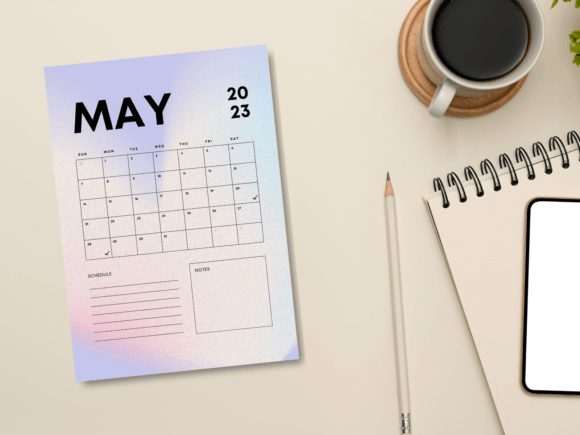
Gradient Minimal May 2023 Planner: A Practical Tool for Focused Monthly Planning
Modern planning isn’t just about remembering appointments. It’s about creating a deliberate framework that lets you move through your days with less mental friction. The Gradient Minimal May 2023 Planner addresses this by stripping away clutter and giving you a clean, distraction-free space to map out your month. Available as a printable PDF and a set of PNG files, it’s designed to be both a standalone resource and a flexible piece of your existing workflow, whether that involves digital note-taking apps, physical binders, or hybrid systems.
Many planners try to do too much, burying you in sections you never fill out. This one takes the opposite approach. The minimal gradient aesthetic is intentionally understated, allowing you to focus on what you’re writing rather than the decoration. It works like a quiet workspace where the layout supports your thinking instead of competing with it. If you’ve ever felt overwhelmed by overly complicated planning systems, this might be the reset you need.
Where the Planner Fits Into a Broader Productivity System
No single tool does it all, and the Gradient Minimal May 2023 Planner isn’t meant to replace your task manager, calendar app, or project management software. It fills a very specific role: giving you a bird’s-eye view of a single month that you can interact with physically or digitally. Before a busy week, you might pull up the PDF on your tablet and mark key deadlines that overlap across work, side projects, and personal commitments. After a project kickoff, you can use the planner to block out deep work sessions or recurring check-ins that need to happen in May.
Think of it as a bridge between high-level goals and daily execution. Your yearly goals might live in a separate document, but this planner lets you translate those into concrete time-bound chunks for one specific month. The 8.5 x 11 inch format is large enough to write in comfortably, yet standard enough to print on any home or office printer without scaling issues. If you prefer digital use, the PNG files let you import the planner into apps like GoodNotes, Notability, or OneNote and annotate directly over the template.
Preparing to Use the Planner Effectively
Before you fill in a single box, take a few minutes to gather the information that will actually land in the planner. A common mistake is opening a new planning tool and staring at blank pages without context. Instead, have a quick reference folder ready—this could be a pinned note in your phone, a snippet of your digital calendar for May, or a list of five to seven priorities you already know will demand your attention. The Gradient Minimal May 2023 Planner becomes vastly more useful when you treat it as a consolidation point rather than a brainstorming scratchpad.
Since the file comes in both PDF and PNG formats, you can also decide upfront how you’ll access it throughout the month. Some people print a fresh copy twice: once at the beginning of May and again mid-month as a checkpoint to see what’s shifted. Others load the PNG into a digital notebook and duplicate it each week for rolling planning. Thinking through this small preparation step saves decision-making energy later.
Choosing Your Annotation Method
The document’s simplicity means you aren’t locked into one way of working. If you print it, use a fine-tip pen for clean entries and a highlighter to visually group related tasks. In digital form, consider using a stylus for handwriting or a text tool for typed entries. The PNG files work particularly well in apps that support layers, letting you place the planner in the background and add translucent digital sticky notes over specific days without permanently altering the template.
Using the Planner Before, During, and After Projects
A month isn’t a vacuum; it almost always contains at least one project that stretches across weeks. The Gradient Minimal May 2023 Planner helps you handle these in phases without needing a separate Gantt chart for every small initiative.
Before a project starts: Use the planner to sketch a rough timeline. In the weekly view or monthly grid, mark when initial research, first drafts, feedback rounds, and final outputs need to happen. Because the layout is minimal, you can draw arrows or add small symbols that mean something to you personally, like a star for review days or a dot for mailing lists or content releases. This isn’t about detailed project management—it’s about making the shape of the project visible against the rest of your life.
During a project: As May moves forward, the planner becomes a progress tracker. You might circle days when you moved a task forward and place a small diagonal line through days when the project stalled. Over a week, patterns emerge that can inform how you schedule similar work in the future. For example, if you consistently complete creative work on Tuesday mornings but struggle on Thursday afternoons, you’ll see that in the clusters of marks. That insight can lead you to protect Tuesday mornings more aggressively next month.
After a project wraps: Keep the completed planner as a lightweight retrospective tool. Instead of writing a separate report, flip through the month and note what the flow of tasks looked like. Did you underestimate how long a particular phase would take? Did a personal appointment unexpectedly collide with a deadline? Those observations, even if just jotted in the margin, become valuable input when you sit down with the next month’s planner.
Integrating the Planner with Other Tools and Resources
The Gradient Minimal May 2023 Planner doesn’t exist in isolation. It connects naturally to the apps, methods, and people that already structure your day. Here’s how that plays out in practice.
Pairing with Digital Calendars
Most of us already run a digital calendar that sends notifications. Use the planner as a weekly review layer on top of that calendar. On Sunday evening, open your Google Calendar or Outlook, look at the upcoming week, and transfer the non-negotiable appointments onto the planner. Then, glance at your task manager and pull in three to five priority tasks for each weekday. This routine takes less than ten minutes but gives you a single sheet of paper (or one digital page) that acts as a daily dashboard free from notification noise.
Supporting Habit Trackers and Goal Systems
If you use a dedicated habit tracker or a goal-setting framework like OKRs, the planner functions as a monthly checkpoint hub. At the start of May, write down the one habit or key result you’re focusing on most. Throughout the month, you can mark days when you took meaningful action directly on the planner’s date cells. At the end of the month, the visual accumulation tells a story that a binary tracker sometimes misses—maybe you missed four days in a row but bounced back stronger, or you consistently struggled around the middle of the month. That nuance matters when you adjust your approach.
Working with Teams or Accountability Partners
If you share responsibilities with a colleague, freelancer, or family member, the PNG version of the planner can be easily shared via cloud drives or collaborative apps. Each person can annotate their copy or, if you’re comfortable with markups, you can use a single digital file to indicate who handles what. This isn’t a replacement for a shared project board, but it’s an excellent lightweight tool for aligning availability and flagging overlapping busy periods before they cause scheduling conflicts.
Practical Workflow Examples Across Different Roles
The versatility of this planner comes from its neutrality. The gradient design is clean enough for professional environments yet unpretentious for personal use. Below are a few ways different users might incorporate it into their existing workflows.
Freelancers and creators often juggle client deadlines, content calendars, and admin days. With the Gradient Minimal May 2023 Planner, you could color-code client work in blue, business development in green, and personal projects in gray. Print the PDF and pin it above your desk so you can glance up and immediately see whether you’re veering into imbalance. Over the month, that wall-mounted sheet becomes a silent accountability partner.
Educators and academics can use the planner to map out grading periods, lecture schedules, and research milestones. The large 8.5 x 11 inch size gives enough room to note class sections or student meeting times without feeling cramped. Post-semester, instructors can look back at a filled planner to evaluate how well their planned pacing matched actual delivery—a useful input for future syllabi.
Small business owners might print two copies: one for operations and one for personal/family scheduling. Keeping them separate visually prevents the kind of mental overlap that makes you feel like you’re always working. The minimal layout ensures that even with two planners, there’s no visual chaos. At the end of the month, compare both sheets during a monthly review to see where boundaries held and where they got blurred.
Productivity enthusiasts and hybrid planners often blend paper and digital systems. The PNG file variant integrates especially well here. Drag it into a digital bullet journal, add hyperlinks to relevant project folders or notes, and you’ve created a clickable monthly hub. Next month, simply duplicate the file, clear the annotations, and start fresh.
Maintaining Consistency and Quality Over the Long Term
One of the biggest challenges with any planning tool is sticking with it past the initial excitement. The Gradient Minimal May 2023 Planner is designed to reduce this friction. Because it’s file-based and undated in a way that you can adapt each month (or reuse the design for other months by updating the header), you aren’t locked into a subscription or a specific year. If you skip a week, you don’t have a bound book full of empty pages staring at you. You just print a fresh sheet or open a clean digital file and pick up where you left off.
To build consistency, tie the planner to an existing habit. If you already sit down with coffee every Monday morning to plan your week, keep the planner within reach and spend three minutes reviewing the month ahead. If you do a Friday afternoon wind-down, use a few minutes to fill in what actually happened and adjust the remaining weeks. These micro-routines make the planner a natural extension of what you’re already doing, not an extra task.
Quality Control in Your Planning Process
Quality planning isn’t about perfectly filled grids; it’s about accurate reflections of reality. If your planner becomes a fantasy document that bears no resemblance to how you spend your time, it loses its value. Conduct a quick honesty check mid-month: Are the tasks written down truly the ones you’re moving forward? Are you overloading certain days out of optimism? The minimalist layout helps here because there’s no room to hide behind decorative elements. What you see is what you committed to. Adjust accordingly.
Also pay attention to physical or digital file quality. The PDF is formatted for standard 8.5 x 11 inch paper, so use decent weight paper if you plan to write heavily or use markers. For digital use, ensure your annotation app handles PNG files without resampling them to a blurry resolution. A crisp template preserves the clean gradient look and keeps your notes legible months later when you reference past months.
Long-Term Use and Adaptability
Although this planner is labeled for May 2023, the underlying structure is timeless. Many users repurpose the template by simply editing the month and year text before printing, or by handwriting the new dates. The gradient aesthetic doesn’t rely on trendy graphics that will look dated in a year. It’s a quiet backdrop that adapts to your needs. Some people buy a collection of similar monthly planners and use them sequentially; others prefer to grab a single file when life gets chaotic and they need to regain a visual handle on the next four weeks.
Because the Gradient Minimal May 2023 Planner is delivered as a digital download, you aren’t generating physical waste every time you want to tweak your approach. Print only what you need, when you need it. If you move to a fully digital system later, the files remain usable. This flexibility makes it a low-risk addition to your toolkit—something you can test for one month and either fold into your permanent workflow or archive without guilt.
Making the Planner Your Own
The value of any planning tool multiplies when you personalize it. The minimal design is an invitation to add your own system of symbols, color codes, or marginal notes. Perhaps you designate the top right corner for a monthly focus word, or the bottom margin for weekly morale-boosting quotes. In a digital context, you can layer habit tracking squares next to the date numbers or embed small icons that represent your main projects. The point is that the planner provides structure without prescribing a rigid method.
For those who enjoy reflecting on progress, the completed planner pages become a kind of minimalist journal. Looking back over several months’ worth of filled sheets can reveal recurring bottlenecks, seasonal energy patterns, or the quiet accumulation of small wins that felt insignificant at the time. It’s a lightweight archive that captures more context than a to-do list but far less bulk than a full journal.
Ultimately, the Gradient Minimal May 2023 Planner works best when you treat it as a practical lens for a single month. It doesn’t promise to revolutionize your life. It simply gives you a clear, well-proportioned space to think, plan, and track what matters in May—and that clarity is often exactly what a busy month needs.