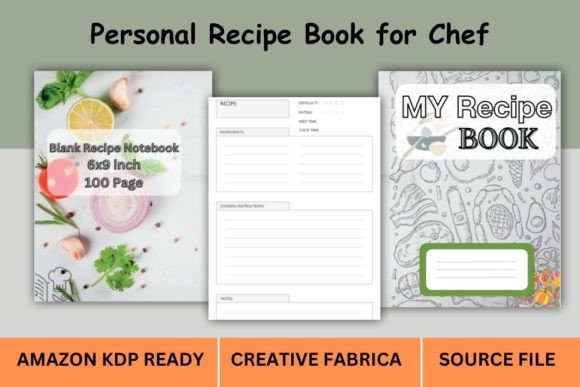
KDP Recipe Book Template: Interior & Cover Files
Getting a recipe collection ready for print can feel like juggling two very different challenges. You need a clean, readable interior that works across dozens of pages, and a cover that catches the eye on a crowded marketplace. A recipe book template built specifically for Amazon KDP bridges that gap, handing you a pre-structured foundation instead of a blank screen. It turns a project that might take weeks of fiddling with margins and master pages into something you can finish over a weekend, whether you are publishing a family cookbook, creating a low-content recipe journal for passive income, or launching your first professional cookbook as a food blogger.
Why a Ready-Made KDP Interior and Cover Saves You Time
Self-publishing a recipe book means juggling recipe formatting, consistent headers, page numbers, and perfectly aligned ingredient lists. Without a template, you often spend more time wrestling design software than actually curating content. A set of KDP-ready interior files eliminates that friction. You open the PDF or source file, place your text and images, and the structural grunt work is already done. The cover, too, comes with correct spine width calculation for your chosen page count — something that often trips up first-timers. For anyone who values speed and wants to start selling quickly on Amazon, Etsy, or a personal shop, that pre-verified layout is a genuine shortcut.
However, not everyone prioritizes speed in the same way. A marketing professional publishing a brand cookbook might care more about design flexibility, while a home cook preserving family recipes may prioritize simplicity over endless customization. Templates sit somewhere in the middle: they offer enough polish to make you look legitimate without forcing you into a complex learning curve.
What You Actually Get in a Recipe Book Template Bundle
When you purchase a well-organized collection like the Recipe Book Template KDP Interior & Cover pack, you’re not just downloading a single file. Typically, you receive high-resolution PDFs for direct printing, plus an editable source file — often AI or EPS — so you can adjust elements if needed. The package normally covers multiple page lengths to match different trim sizes and content depths. In the case of the 8.5×11-inch no bleed format, you’ll often find options for 100, 120, or 150 pages already structured with proper margins and guides. This saves you from calculating how a 120-page book differs from a 100-page book in spine width, which directly affects your cover design.
You also get a CMYK color format, already set to 300 DPI, so images and decorative lines print crisply without that fuzzy “homemade” look. For many, the real value is that everything is pre-bundled: interior, cover, and any instructional notes. That completeness matters especially if you’re managing multiple low-content books or plan to publish several recipe journals under different themes.
Who Finds These Templates Most Useful
Not every cookbook project starts from the same place. A seasoned graphic designer might only need a quick starting grid; a beginner wants something practically foolproof. A recipe book template for KDP serves surprisingly different groups once you look closely.
First-Time Self-Publishers and Hobby Cooks
If you’ve never formatted a book for print, the idea of trim size, bleed, and safe zones can feel daunting. Here, the template acts like a guided structure. You can literally type over placeholder text with your own recipes, swap in photos, and export. Because the file already meets Amazon KDP’s technical requirements, you reduce the risk of upload rejections. That peace of mind is often the deciding factor for someone who just wants to see their grandmother’s pie recipes in a beautiful printed form without hiring a designer.
Small Business Owners and Etsy Shop Creators
For entrepreneurs who sell low-content books, templates are production assets. Creating a recipe journal that others can gift or use as a DIY cookbook requires a reproducible interior that looks professional but remains generic enough to sell repeatedly. The 8.5×11 size works well for handwritten entries, so you can design a fill-in-the-blank recipe keeper. Having a bundled cover saves you an extra design step, making it easier to launch multiple variations quickly. For this group, reliability is key; you want consistent page numbering, identical header styles from page 1 to page 120, and a cover file that won’t get cropped wrong.
Food Bloggers and Content Creators
When you already have a library of tested recipes online, packaging them into a downloadable cookbook becomes a natural next step. The template approach respects your time. Instead of starting a layout from scratch, you drop in blog content, adjust headings, and keep your focus on the eating experience rather than design theory. Many bloggers find the 8.5×11 format suitable for full-color photo pages, and the no-bleed option keeps photos contained neatly without running to the edge, which can simplify the proofing stage.
Practical Scenarios: How Real Users Put the Files to Work
Imagine you’re a new parent who wants to compile healthy toddler snacks into a printable ebook to share with fellow parents. You open the 100-page interior PDF, verify the margins, and paste your gathered recipes. In less than an hour, you have a complete file ready for Kindle Direct Publishing. Or suppose you run a small bakery and want to create a branded recipe booklet as a customer thank-you gift. The editable source file lets you insert your logo and adjust colors to match your shop’s identity before sending it to a local printer.
Another common case is the freelance designer who offers cookbook formatting as a service. Instead of building everything from scratch, they purchase a high-quality source file as a foundation, then customize it for each client. This lowers project turnaround time significantly while still delivering a unique final product. For them, the real value lies in the source file’s resolution and its CMYK readiness for professional printing, not just Amazon KDP.
What Matters Beyond a Pretty Cover
When evaluating any recipe book template interior or cover, it’s easy to focus on aesthetics. Yet long-term usefulness depends on invisible factors: page number alignment, consistent margin widths, and handling of section breaks. A good template keeps recipe title styles uniform whether you have 90 pages or 130. The cover file must accommodate the exact spine thickness after you adjust the page count; many pre-made packages include a spine calculation chart or multiple cover variants to prevent the dreaded misaligned spine text.
Another consideration is accessibility of the source file. Some users are comfortable with Adobe Illustrator; others only know how to open a PDF. A bundle that offers both formats invites a wider range of skill levels. If you’re a creative who likes to push boundaries, the editable AI file becomes your playground. If you’re a pragmatist who wants a done-for-you solution, the high-resolution PDF serves that need directly. Both approaches are valid, and a strong template set supports both without forcing you into a complex workflow.
Deciding If This Template Matches Your Project
Before you purchase, it helps to list your own priorities and see how the template lines up. Do you absolutely need the 8.5×11 inch trim? For a classic cookbook, that size feels substantial, but a smaller 6×9 may be more portable. The templates discussed here are intentionally large-format, which suits photo-heavy layouts or fill-in recipe books where extra writing space is a selling point. If your project fits that, half the decision is made.
Next, consider your comfort with digital file handling. The download comes compressed, so you need a computer to unzip and inspect the PDF, EPUB, and source formats. This is straightforward for most, but worth noting if you’re accustomed only to browser-based tools. The absence of a physical product also means you can start immediately after purchase — no waiting for shipping — a real advantage when you’re excited to get your book listed.
Your project timeline influences the choice as well. Templates eliminate the design-testing phase, so you can publish days or weeks sooner than if you formatted manually. For someone aiming to capitalize on a seasonal cooking trend, that speed has tangible commercial value.
Making the Most of Your Template Without Overcomplicating It
One quiet benefit of using a KDP-ready interior is that you’re indirectly learning about print production. As you add recipes, you notice how text flows, why balancing white space matters, and how the cover file’s layers correspond to the final printed piece. You may start as a beginner but finish the project with a real understanding of self-publishing mechanics — knowledge you can carry to your next book.
If you’re an educator leading a community recipe collection workshop, the template becomes a teaching aid. Participants contribute a recipe, and you assemble a group cookbook in record time. The structured format reduces the cognitive load, so people concentrate on ingredient stories rather than font sizes. The consistent 300 DPI resolution also ensures that scanned handwritten recipe cards look crisp when embedded alongside typed text.
For those worried about being locked into a single design, the included source file provides an escape route. Change the accent color, adjust typography, or add new section dividers without starting over. That flexibility means the template can grow with your brand. A baker who starts with a printable journal might later morph the same layout into a follow-up cookbook with minimal rework.
Choosing Quality That Feels Professional on the First Try
When a template is labeled “Amazon KDP Ready,” it should mean more than just correct dimensions. It should undergo real test uploads and verification. The best packs, like the one described here, come with proven file structures — no hidden font issues, no RGB elements lurking in a CMYK file. This technical diligence matters because Amazon’s automated checker will flag even slight inconsistencies. You don’t want to face a rejection after spending hours populating recipes. Knowing that the interior and cover were built specifically for KDP removes that anxiety, especially if you’re new to the platform.
The availability of multiple page counts (100, 120, 150) lets you scale your book without buying a new template each time. That’s a sensible design choice: you can start with a 100-page recipe journal, and if demand grows, expand to 150 pages without changing the cover style entirely. It’s a small detail that speaks to long-term thinking.
Who Might Want to Look Elsewhere
No single template fits every scenario. If your cookbook is heavily illustrated and requires full-bleed photos that run off the page edge, a no-bleed template might feel creatively limiting. Likewise, if you prefer a very unconventional, magazine-style layout with overlapping images and text, a structured interior might feel too rigid. In those cases, a custom design from scratch would serve you better. But for the vast majority of functional, readable recipe collections — the kind people actually use while cooking — a clean, well-spaced template is more than enough.
Bringing It All Together
A Recipe Book Template KDP Interior COVER Page Amazon KDP Interior Recipe Book Template 8.5×11 Inches bundle offers more than a shortcut. It provides clarity, reduces technical guesswork, and opens the door to self-publishing for people who might otherwise never see their recipes in print. Whether you’re a creative hobbyist documenting family food traditions, a business owner adding a new digital product to your shop, or a freelancer speeding up client work, the right set of files becomes a reliable partner in getting your book live. And when you finish and hold that first proof copy, you’ll appreciate that the template gave you a professional starting point without stealing your voice.