Using a 30 Day Challenge Printable Template to Build Consistent Habits and Track Real Progress
A 30 Day Challenge Printable Template is more than a simple tracker. It functions as a focused planning layer that sits between the big idea and the daily follow‑through. Many people start a month‑long goal with energy, only to lose clarity by day five. A well‑designed template removes guesswork about what to do next, records small wins, and keeps the original intention visible. This article explores how a 30 Day Challenge Printable Template fits into real workflows, how to integrate it with other tools, and practical strategies to make the 30‑day format deliver lasting results.
What a 30 Day Challenge Printable Template Actually Solves
Goal setting often fails because the gap between intention and action is too wide. A template closes that gap by turning a broad resolution—read more, move daily, write a book draft—into a clear 30‑day sequence. It becomes a single‑page command center: a place to mark each day’s completion, jot a quick note, and see momentum build.
This particular template package goes beyond a single PDF. It includes AI Illustrator files (open source), EPS, print‑ready PDFs, and a link to Canva templates, making it a flexible design asset as well as a personal accountability tool. Because it arrives in multiple sizes—US Letter (8.5 × 11 in), A4 (210 × 297 mm), 7.5 × 9.25 in, and 6 × 9 in—users can match the format to their binder, planner, or publishing project without extra resizing work.
Where the Template Fits in a Broader Planning Process
Think of a 30‑day challenge as a micro‑project. The template works before, during, and after that project.
- Before starting: Print or load the template and decide the one specific action you’ll track. Use the open‑source AI or EPS files to brand it, add a color code, or integrate it into an existing planner.
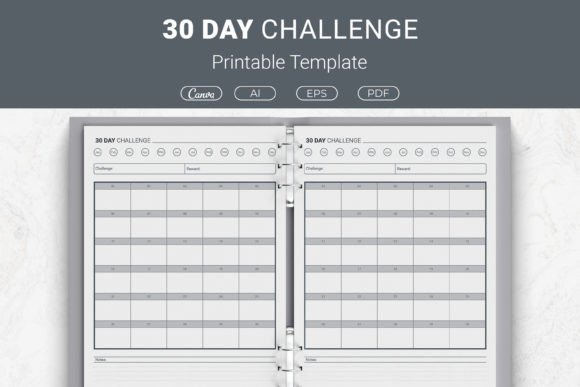
- During the challenge: The checkerboard layout becomes a quick visual log. Place it on a desk, bullet journal, or refrigerator—somewhere you see it multiple times a day. Fill in a box each evening, and let the unbroken chain become its own motivation.
- After the 30 days: Review the filled template. It’s a data point, not just a record. Did streaks break around weekends? Did energy dip in week three? That reflection informs the next cycle.
Integrating the Printable into a Hybrid Digital‑Analog System
Many productivity‑minded users blend paper and digital. The Canva template link makes it easy to drop the tracker into a wider digital ecosystem. For example, a content creator might design a branded challenge workbook in Canva, export the pages as a PDF, and sell it on Gumroad—or print a personal copy while keeping a digital backup. The EPS and AI files give graphic designers and small business owners the source code to tweak fonts, add logos, or build the tracker into a larger planner interior for Kindle Direct Publishing (KDP).
For personal use, print the US Letter or A4 version at home and slip it into a clear binder sleeve. Mark progress with a wet‑erase marker so the sheet stays reusable. Alternatively, print the 6 × 9 in size and trim it to fit a pocket planner or traveler’s notebook. The multi‑size package ensures you are not locked into one format.
Workflow Example: A 30‑Day Business Development Challenge
Imagine a freelancer who wants to build a consistent outreach habit. The broad goal is “grow my client pipeline.” That’s overwhelming. The template forces a refinement: “Send three personalized emails to potential clients every weekday.”
Here’s how the workflow looks with the template:
- Prep: Open the AI file, customize the header to read “Outreach Challenge,” and add a brief instruction line. Print five copies—one for each week—or keep a single sheet and mark days 1–30.
- Daily execution: After sending the emails, check the day’s box. Keeping the sheet visible on the desk acts as a cue and a reward.
- Weekly review: The template has space for notes (most layouts include a small notes area). Jot down response rates or interesting conversations. This turns the tracker into a lightweight CRM snapshot.
- Month‑end assessment: The completed sheet shows exactly how many touchpoints happened. That data informs the next 30‑day cycle: maybe shift to LinkedIn outreach, or adjust the daily target.
Because the template is simple, it doesn’t compete with a project management tool like Notion or Trello. Instead, it complements them. The digital board holds the lead list; the paper tracker holds the commitment. No logging into a device needed—just a glance.
Compatibility with Creative and Publishing Workflows
The 30 Day Challenge Printable Template is explicitly sold with KDP planners in mind. For self‑publishers, the open‑source AI and EPS formats mean they can build a commercial product without starting from scratch. A typical process: download the Illustrator file, build a 100‑page challenge notebook by duplicating the tracker page, add a cover in Canva, and export a print‑ready PDF. The range of sizes lets the publisher target different markets—the 6 × 9 in fits a standard paperback trim, while the 7.5 × 9.25 in works well for a larger workbook.
For educators or coaches, the ready‑to‑print PDFs can become handouts for a 30‑day course. Because they are designed with a clean, clutter‑free layout, students focus on the action, not on deciphering a busy design.
Practical Preparation: Getting the Most from the Template
Before day one, spend ten minutes setting up the environment that will support the tracker.
- Print quality: Use a heavier paper stock (at least 28 lb) if you plan to use markers or highlighters. For KDP interiors, the PDFs are already formatted for bleed and margins, so you can upload directly to Amazon without extra tweaks—just verify the trim size.
- Pair with a trigger: Attach the tracking action to an existing habit. For example, fill the square right after brushing teeth at night. This anchors the template use to an automatic behavior.
- Define a minimum viable day: On tough days, what’s the smallest acceptable action? For a fitness challenge, it might be five minutes of stretching. Write that minimum on the template itself. It prevents a missed day from becoming a reason to quit.
Maintaining Consistency Across 30 Days
Consistency is not about perfection; it’s about recovery. The template’s visual grid helps because it shows a streak without being punitive. If a day is missed, the empty box is information, not failure. Users can circle it and write a one‑word reason: “travel,” “illness.” Over 30 days, patterns emerge.
For team or group challenges, share the Canva link so everyone works from the same design. A group leader can customize a single design, distribute the PDF, and hold brief check‑ins. The uniform tracker keeps the focus on shared progress rather than design differences.
Long‑Term Use and Reusability
Beyond a single 30‑day sprint, the template becomes a season‑by‑season tool. Print a new copy each month with a different headline. Many users keep a binder of past challenges. Over a year, this creates a personal archive of effort—useful for performance reviews, habit audits, or simply seeing how far you’ve come.
Because the AI and EPS files are open‑source, the template can evolve with your needs. Add a column for quantitative metrics (weight, word count, revenue) next to the checkboxes. Or split the page into two 15‑day sections with a midpoint reflection prompt. The underlying structure supports modification without requiring advanced design skills.
Quality Control When Using the Template for Commercial Products
If you’re inserting the template into a KDP planner or a digital course, take a few extra steps:
- Open the PDF in Adobe Acrobat to confirm fonts are embedded and the color profile is CMYK if printing with a service like KDP Print.
- Check the trim lines for each size variant. The 7.5 × 9.25 in version, for instance, should have adequate margins for binding.
- Test a printed copy before publishing. What looks crisp on screen can sometimes feel too small or light on paper. Adjust line weights in the Illustrator file if needed.
Measuring Outcomes: Beyond the Checkmark
A filled tracker is satisfying, but the real outcome is a changed behavior or a completed project. At the end of the 30 days, ask a few concrete questions:
- What percentage of days did the minimum action happen?
- Did the challenge expose time‑consumption patterns (e.g., too much time on email, not enough on deep work)?
- Is the habit now automatic enough to reduce to a lighter tracking method, or does it need another 30‑day cycle?
The template’s notes section holds answers that a purely digital tracker might scatter across apps. Having them on one page makes it easy to spot correlations—like sleep quality and workout consistency—that inform better planning.
Bringing It All Together
A 30 Day Challenge Printable Template is most valuable when it is the simplest tool in a system. It does not replace project management software, coaching, or community accountability; it anchors them. The multi‑file format (AI, EPS, PDF, Canva link) and multiple size options of this package make it a practical asset for personal growth and commercial use alike. Whether you are printing a single copy for your fridge or building a line of habit‑tracking journals on KDP, the template gives you a solid, adaptable foundation that respects how real work gets done—one day at a time.