Understanding the Priority Matrix Printable Template: A Hands-On Tool for Smarter Task Decisions
Many productivity methods promise to bring order to a chaotic to-do list, but few are as elegantly clear as the urgency-importance matrix. A Priority Matrix Printable Template takes that classic framework and turns it into a tangible, reusable sheet you can hold, write on, and revisit. It’s not an app, not a subscription – it’s a physical template that divides your tasks into four quadrants: urgent, not urgent, important, and not important. For anyone who learns best by writing things down, this simple sheet can replace hours of mental reshuffling with a few minutes of focused thought.
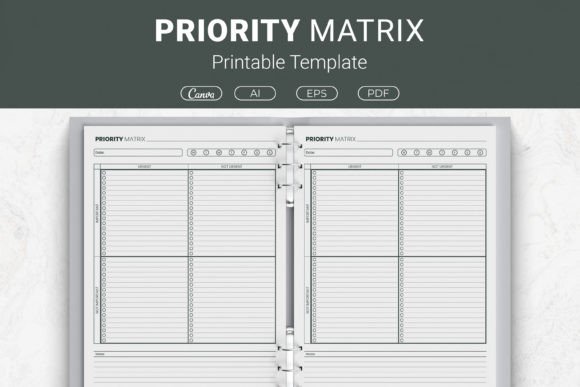
What makes a printable version distinct from a whiteboard sketch or a digital equivalent is the package that often accompanies it. A well-designed Priority Matrix Printable Template bundle usually includes multiple file formats: open-source AI Illustrator files for deep customization, an EPS file for professional design workflows, a print-ready PDF, and often a link to a Canva template for quick online edits. This means you aren’t locked into one way of using it – you can tweak colors, fonts, and labels to match your planner aesthetic, or simply print the ready-made version and go. Sizes commonly available include US Letter (8.5 x 11 inches), A4 (210 x 297 mm), as well as more compact dimensions like 7.5 x 9.25 inches and 6 x 9 inches, which opens up possibilities far beyond standard office paper.
What the Four Quadrants Actually Do for Your Brain
The matrix works because it forces a two-step evaluation that many lists skip. You first ask, “Is this important?” Then, “Is this urgent?” The intersection gives you one of four clear landing spots:
- Important and Urgent: Crises, deadlines, and tasks that need immediate attention. These go at the top left – do them now.
- Important but Not Urgent: Strategic planning, skill-building, relationship maintenance. This quadrant prevents future fires and often gets squeezed out in busy weeks.
- Urgent but Not Important: Interruptions, some emails, meetings that feel pressing but don’t move the needle. Delegate or batch these.
- Not Urgent and Not Important: Time-wasters, mindless scrolling, trivial busywork. Eliminate or postpone.
The distinction matters because without a printout, it’s easy to treat every task as equally weighty. A physical Priority Matrix Printable Template gives you a limited canvas where you visually group your obligations. There’s something psychologically different about seeing your “important but not urgent” box fill up with only three items while the “urgent but not important” quadrant overflows – it’s a wake-up call that no app notification can replicate.
Where the Printable Format Fits Among Other Productivity Approaches
You probably already know about digital task managers that automatically sort tasks by due date, or note-taking apps that let you tag items by priority. These tools are powerful, but they often come with a learning curve, subscription costs, and the constant lure of notifications. A printed sheet sits on your desk without demanding updates. It doesn’t reschedule itself, and it doesn’t disappear when your battery dies. That zero-distraction simplicity is the core tradeoff.
Compare that to creating your own matrix in a bullet journal or on a whiteboard. A DIY approach is flexible and free, but it requires drawing the grid, figuring out spacing, and often accepting that it won’t look as consistent week after week. A pre-designed Priority Matrix Printable Template saves you that setup time and makes the structure immediately recognizable. With files in Illustrator or PDF, you print exactly what you need – one sheet for a daily brain dump, a blank stack for team meetings, or even a full notebook version bound as a planner insert.
Then there’s the growing popularity of using these templates for Kindle Direct Publishing (KDP). If you’re creating a productivity planner to sell on Amazon, a ready-to-use interior page that already includes the priority matrix layout dramatically shortens your design process. The template owner may have already optimized the file for bleed, trim, and readability. For someone assembling a low-content book, this is a practical shortcut that still lets you customize colors and headers within the provided Canva link or source files.
Strengths You’ll Notice Right Away
One of the biggest advantages is reusability and consistent structure. Because the template doesn’t change shape, you build a routine around it. Every Monday morning you pull a fresh sheet, and your brain knows exactly where to look. Over time, this predictability reduces the mental friction of starting your week’s planning.
The multi-format package also offers a level of control that a single-page download doesn’t. You can:
- Adjust quadrant labels if you prefer words like “Respond” and “Defer” instead of standard urgency terms.
- Resize the template to fit a half-letter discbound planner or a traveler’s notebook insert.
- Add your logo or branding if you plan to use the page in a client coaching binder.
Physically writing tasks down engages a different part of your memory than typing. Studies on note-taking suggest that handwriting can improve retention and help filter out low-value information. When you jot a task into the “important/not urgent” box with a pen, you’re making a more deliberate commitment than dragging a digital card between columns. The Priority Matrix Printable Template turns prioritization into a focused ritual rather than a multi-tab digital chore.
Tradeoffs and Limitations Worth Knowing
No tool is perfect for every situation. A printable sheet lacks the collaborative features that teams might need. You can’t tag a colleague, attach files, or get a push reminder when a due date approaches. If your role depends on shared visibility, you’ll likely need a digital board to supplement your personal matrix.
There’s also the hidden cost of maintenance. Physical sheets accumulate. If you don’t have a filing system, last month’s priority list ends up wrinkled in a bag. Some people find that the tangibility that helps with focus also introduces clutter. Pairing the template with a binder or a designated planner slot solves this, but it’s an extra step to remember.
For those who thrive on data analytics, a printable page will never show you a trend line of how often tasks shift from one quadrant to another. You won’t get automated time-tracking or integration with your calendar. In situations where long-term pattern analysis matters, a printable template serves best as a daily snapshot, not a comprehensive system.
When a Priority Matrix Printable Template Is the Right Choice
This tool shines when you need to disconnect from screens and think deeply. If you’re a parent trying to balance household responsibilities with a side project, sitting down with a single sheet and a pen can clarify what needs immediate action versus what can wait until the weekend. Coaches and therapists often use printed matrices with clients because the visual layout encourages honest conversation about time use without the distraction of a glowing screen.
Freelancers and solopreneurs who manage many small client requests also benefit. You might print a new sheet at the start of each day and spend ten minutes sorting everything that has come in through email, messages, and voicemail. Because the template is undated and reusable, you don’t waste paper if a day shifts drastically; you simply pull another copy and re-think.
Small business owners who are building low-content planners for the KDP marketplace find immense value in a template that comes with commercial-use-ready files. Instead of spending hours designing the matrix from scratch and testing print alignment, you can focus on cover design, content arrangement, and niche research. The inclusion of multiple sizes – from a full US Letter sheet down to a compact 6x9 inch book – means you can aim for different product categories without redesigning the core layout.
Situations Where a Different Approach Might Work Better
If your work is heavily email-driven and you’re frequently on the move, a digital system may keep you more responsive. Someone who manages a support ticket queue, for example, needs to see incoming requests sorted by real-time urgency, and a printed page can’t refresh itself. Similarly, project managers overseeing multiple people might rely on shared kanban boards that show task status across the whole team. An individual Priority Matrix Printable Template can still be used for personal reflection outside the team tool, but it would be a complement, not a replacement.
Consider also those with visual or motor impairments that make handwriting difficult. While you can type into the Canva-linked template and then print, the core benefit of tactile, pen-on-paper focus might be less accessible. In those cases, a voice-to-text task manager with visual priority indicators might offer a smoother experience.
How the Template Package Changes Your Options
When you compare a basic free PDF that you find online to a comprehensive Priority Matrix Printable Template package, the differences extend beyond the price tag. A basic download often gives you one fixed size, no editable layers, and no guidance on how to print without clipping. The more developed package described here typically includes source files so you can modify line thickness, add instructional text, or translate the quadrants into another language. The Canva template link opens up on-the-fly editing for people who don’t own design software but still want a personalized look.
The inclusion of EPS files matters for those sending designs to professional printers – it preserves vector quality at any scale. A PDF ensures that if you just want to print and go, the layout remains intact regardless of the device you’re opening it on. These behind-the-scenes details reduce the frustration of mismatched margins, blurry lines, or formatting that shifts when you change paper size.
Realistic Examples of Putting the Template to Work
Imagine a marketing manager preparing for a product launch. She downloads a Priority Matrix Printable Template in A4 size. On Monday morning, she writes down all the tasks floating in her head: finalize ad copy, send assets to the design team, respond to a vendor questionnaire, schedule social posts, and attend a non-essential department meeting. She places the ad copy and design handoff in “Important and Urgent,” the vendor questionnaire in “Urgent but Not Important” (she delegates it), social posts in “Important but Not Urgent” (she schedules them for later in the week), and the non-essential meeting lands in “Not Urgent and Not Important.” Within five minutes, her day has a clear focus, and she avoids the trap of attending a meeting that could have been an email.
At home, a couple uses the 7.5 x 9.25 inch version pinned inside a kitchen cabinet. They jot down household tasks: fix the leaking tap (important, urgent), research summer camps for the kids (important, not urgent), reply to a neighbor’s party invitation (urgent, not important), and binge-watch a new series (not urgent, not important). The visual separation helps them negotiate who does what without an extended discussion that eats into the evening.
Meanwhile, a coach selling a time management workbook on Amazon KDP uses the 6x9 inch template as a central interior page. She customizes the colors within Canva to match her brand palette, exports a print-ready PDF, and folds it into her low-content planner design. The matrix becomes a signature element of her book, and because the template was built with commercial use in mind, she doesn’t worry about licensing issues.
Evaluating Whether This Template Fits Your Prioritization Style
Think about the last time you felt overwhelmed by tasks. Did you reach for a pen and paper or open an app? If the former, you’re already predisposed to benefit from a physical tool. The question then becomes whether you need a bare-bones grid or a polished, editable Priority Matrix Printable Template that you can adapt over time. The polished version saves you from the small frictions that can derail a new habit: misaligned boxes, missing size options, or the inability to change a label that doesn’t feel intuitive.
If you’re someone who redesigns your planner every few months, the source files matter. If you’re looking for a one-shot printout for a specific project, the ready-to-print PDF may be all you need – and having it in multiple sizes means you aren’t forced to use a full page when a half-sheet would do. The versatility to print at home, slip pages into binders, or integrate into a commercial planner project gives the package a longer lifespan than a single-purpose download.
Ultimately, the Priority Matrix Printable Template sits at the intersection of classic time management theory and modern customization. It honors the Eisenhower principle but hands control back to you: what the quadrants are called, how they’re sized, where they live in your physical or published work. When used thoughtfully, it becomes less about the tool itself and more about the clarity it creates in those few minutes you spend filling it out.
Your choice between a printable, a digital tool, or a hybrid approach should reflect how you process information best and where you need the least resistance. A crisp, well-designed template removes one more barrier to getting your priorities in order – and that might be the difference between a scattered morning and a deliberately productive one.